Developer Guide
- Acknowledgements
- Introduction
- Setting up, getting started
- Design
- Implementation
- Documentation, logging, testing, configuration, dev-ops
- Appendix: Requirements
- Appendix: Instructions for Manual Testing
- Appendix: Effort
Acknowledgements
This project was based on the AddressBook Level-3 project created by the SE-EDU initiative.
Libraries used: JavaFX, Jackson, JUnit5
Introduction
Welcome to the developer’s guide for Trace2Gather! Trace2Gather is a desktop app for managing hotel rooms and guests, optimized for use via a Command Line Interface (CLI) while still having the benefits of a Graphical User Interface (GUI).
This guide is meant for developers who may want to contribute to our code base, or use our codebase to build their own project.
Setting up, getting started
Refer to the guide Setting up and getting started.
Design
This section shows the various high level components that make up the application, how they interact with one another, and their lower level implementation.
 Tip: The
 .puml files used to create diagrams in this document can be found in the diagrams folder. Refer to the PlantUML Tutorial at se-edu/guides to learn how to create and edit diagrams.
Architecture
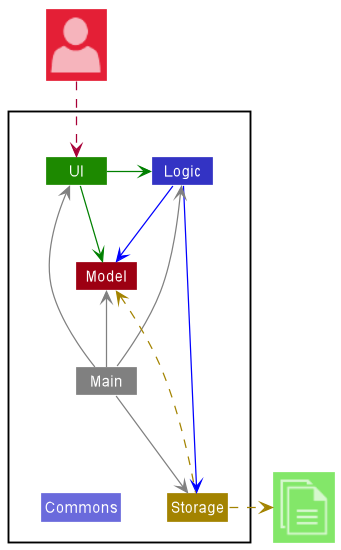
The Architecture Diagram given above explains the high-level design of the App.
Given below is a quick overview of main components and how they interact with each other.
Main components of the architecture
Main has two classes called Main and MainApp. It is responsible for,
- At app launch: Initializes the components in the correct sequence, and connects them up with each other.
- At shut down: Shuts down the components and invokes cleanup methods where necessary.
Commons represents a collection of classes used by multiple other components.
The rest of the App consists of four components.
-
UI: The UI of the App. -
Logic: The command executor. -
Model: Holds the data of the App in memory. -
Storage: Reads data from, and writes data to, the hard disk.
How the architecture components interact with each other
The Sequence Diagram below shows how the components interact with each other for the scenario where the user issues the command guest Alex.
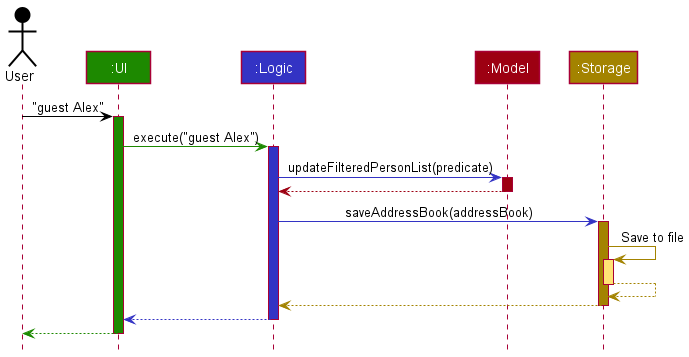
Each of the four main components (also shown in the diagram above),
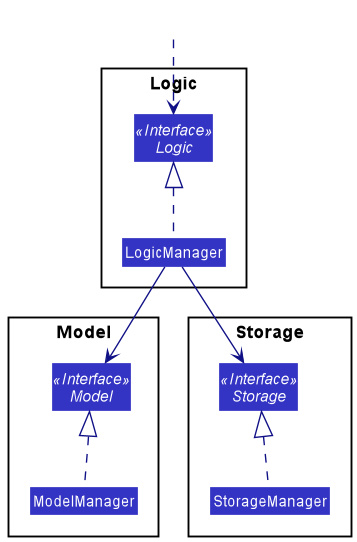
- defines its API in an
interfacewith the same name as the Component. - implements its functionality using a concrete
{Component Name}Managerclass (which follows the corresponding APIinterfacementioned in the previous point).
For example, the Logic component defines its API in the Logic.java interface and implements its functionality using the LogicManager.java class which follows the Logic interface. Other components interact with a given component through its interface rather than the concrete class (reason: to prevent outside component’s being coupled to the implementation of a component), as illustrated in the (partial) class diagram below.
The sections below give more details of each component.
UI component
The API of this component is specified in Ui.java
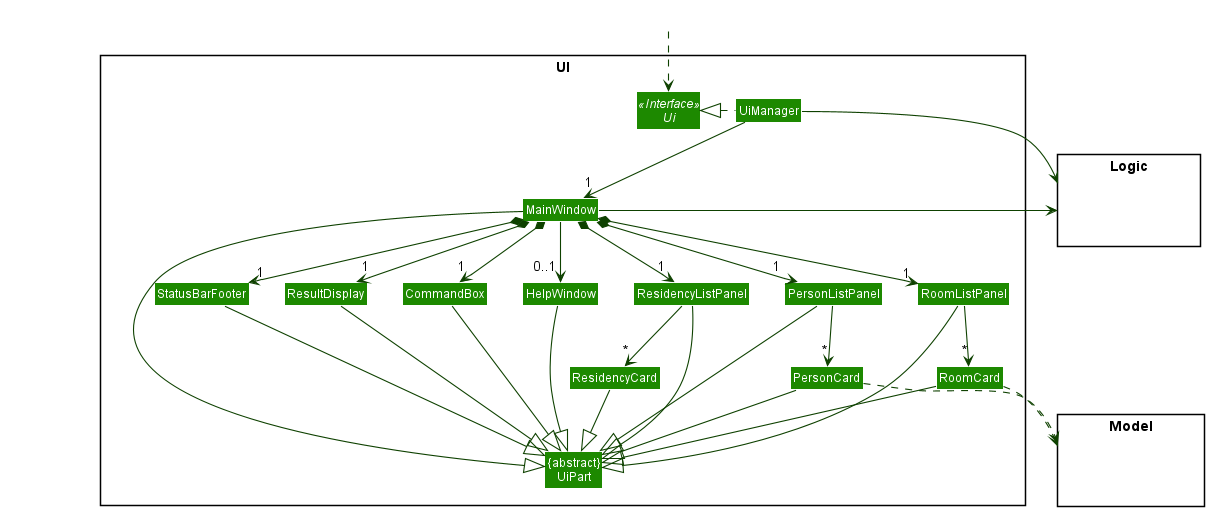
The UI consists of a MainWindow that is made up of parts e.g.CommandBox, ResultDisplay, PersonListPanel, StatusBarFooter etc. All these, including the MainWindow, inherit from the abstract UiPart class which captures the commonalities between classes that represent parts of the visible GUI.
The UI component uses the JavaFx UI framework. The layout of these UI parts are defined in matching .fxml files that are in the src/main/resources/view folder. For example, the layout of the MainWindow is specified in MainWindow.fxml
The UI component,
- executes user commands using the
Logiccomponent. - listens for changes to
Modeldata so that the UI can be updated with the modified data. - keeps a reference to the
Logiccomponent, because theUIrelies on theLogicto execute commands. - depends on some classes in the
Modelcomponent, as it displaysPersonobject residing in theModel.
Logic component
API : Logic.java
Here’s a (partial) class diagram of the Logic component:
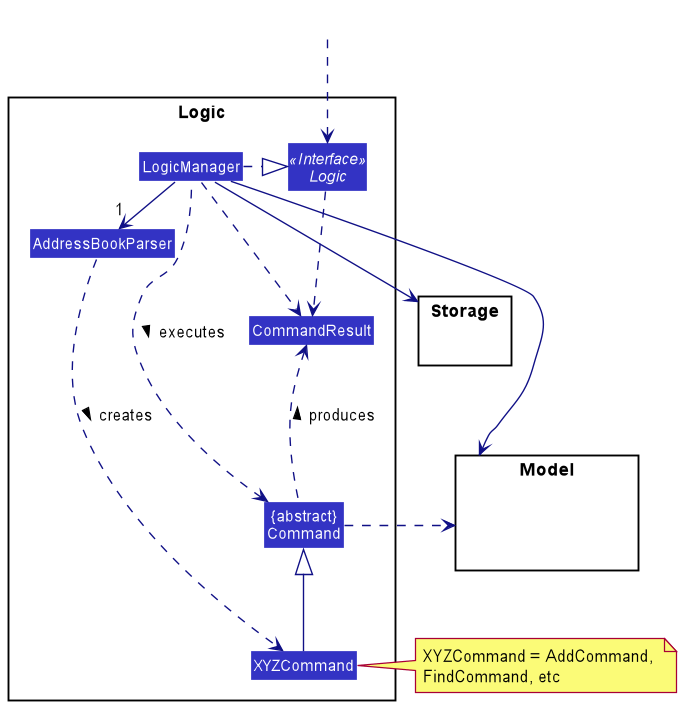
How the Logic component works:
- When
Logicis called upon to execute a command, it uses theAddressBookParserclass to parse the user command. - This results in a
Commandobject (more precisely, an object of one of its subclasses e.g.,AddCommand) which is executed by theLogicManager. - The command can communicate with the
Modelwhen it is executed (e.g. to add a person). - The result of the command execution is encapsulated as a
CommandResultobject which is returned fromLogic.
The Sequence Diagram below illustrates the interactions within the Logic component for the execute("guest Alex") API call.
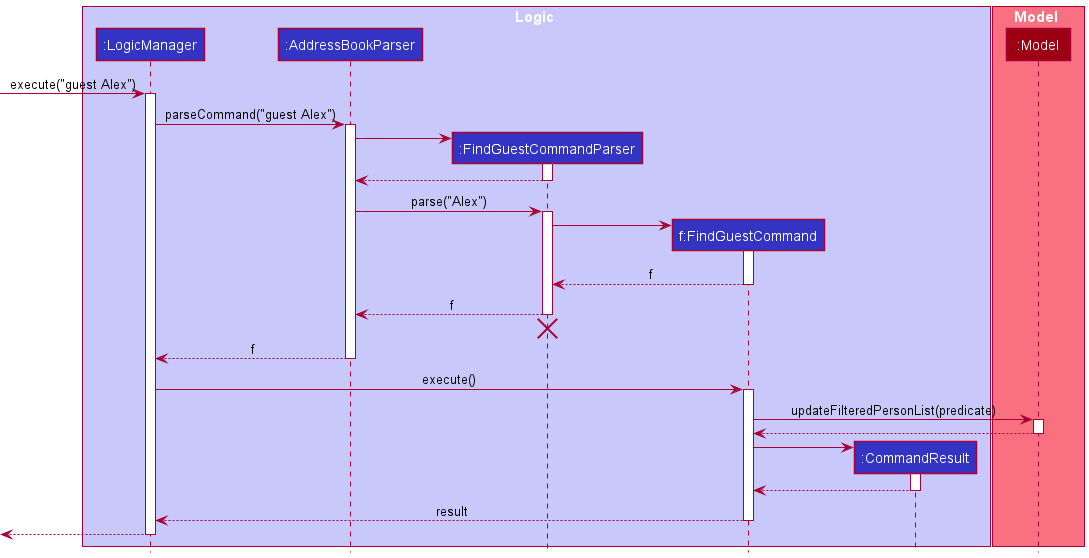
 Note: The lifeline for
 DeleteCommandParser should end at the destroy marker (X) but due to a limitation of PlantUML, the lifeline reaches the end of diagram.
Here are the other classes in Logic (omitted from the class diagram above) that are used for parsing a user command:
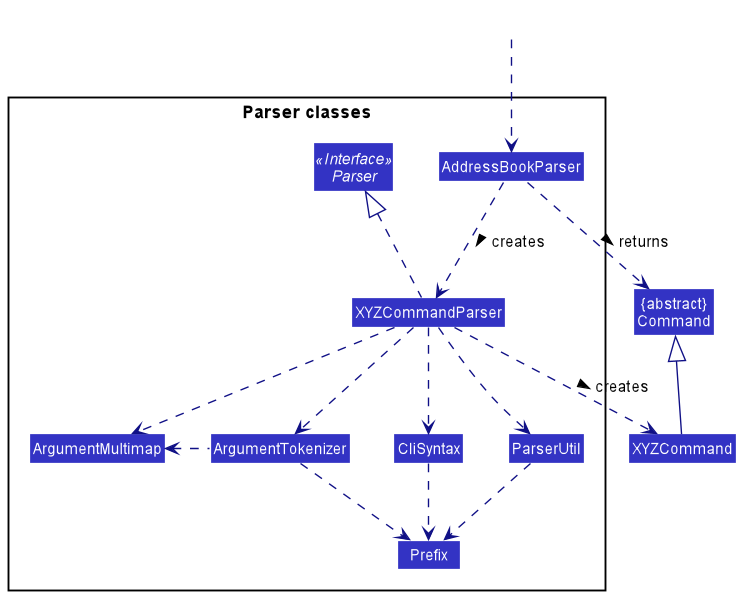
How the parsing works:
- When called upon to parse a user command, the
AddressBookParserclass creates anXYZCommandParser(XYZis a placeholder for the specific command name e.g.,AddCommandParser) which uses the other classes shown above to parse the user command and create aXYZCommandobject (e.g.,AddCommand) which theAddressBookParserreturns back as aCommandobject. - All
XYZCommandParserclasses (e.g.,AddCommandParser,DeleteCommandParser, …) inherit from theParserinterface so that they can be treated similarly where possible e.g, during testing.
Model component
API : Model.java
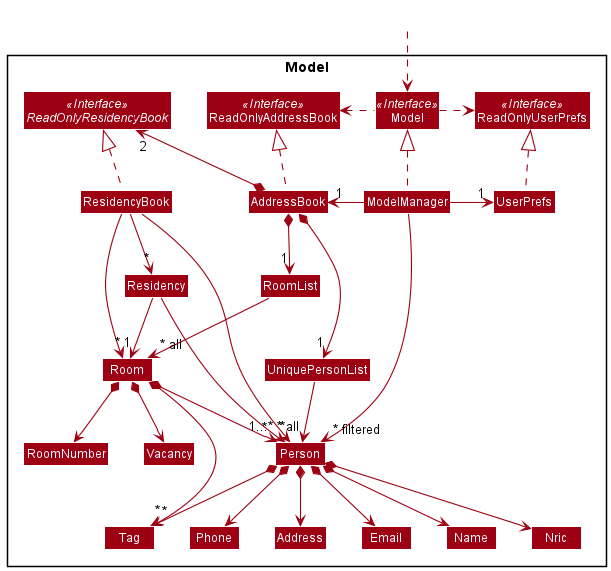
The Model component,
- stores the address book data.
- All
Personobjects are contained in aUniquePersonListobject. - All
Roomobjects are contained in aRoomListobject. - All
Residencyobjects are contained in aResidencyBookobject.
- All
- stores the currently ‘selected’ object(s) (e.g., results of a search query) as a separate filtered list which is exposed to outsiders as an unmodifiable
ObservableListthat can be ‘observed’ e.g. the UI can be bound to this list so that the UI automatically updates when the data in the list change.-
Personobjects are stored inObservableList<Person> -
Roomobjects are stored inObservableList<Room> -
Residencyobjects are stored inObservableList<Residency>
-
- stores a
UserPrefobject that represents the user’s preferences. This is exposed to the outside as aReadOnlyUserPrefobjects. - does not depend on any of the other three components (as the
Modelrepresents data entities of the domain, they should make sense on their own without depending on other components)
Storage component
API : Storage.java
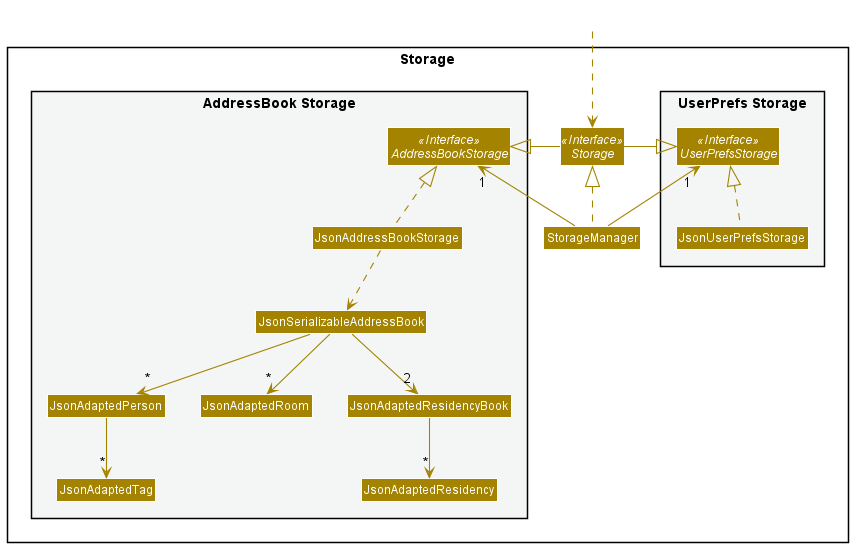
The Storage component,
- can save both address book data and user preference data in json format, and read them back into corresponding objects.
- inherits from both
AddressBookStorageandUserPrefStorage, which means it can be treated as either one (if only the functionality of only one is needed). - depends on some classes in the
Modelcomponent (because theStoragecomponent’s job is to save/retrieve objects that belong to theModel)
Common classes
Classes used by multiple components are in the seedu.addressbook.commons package.
Implementation
This section describes some noteworthy details on how certain features are implemented.
Guest and Room search feature
Implementation
The search mechanism is facilitated by LogicManager. It extends Logic and its invocation is via the AddressBookParser.
-
AddressBookParser#parseCommand()— Interprets the command the user inputs to invoke theFindGuestCommandandFindRoomCommand. -
FindGuestCommand#execute()— Finds the guest in the hotel with matching name -
FindRoomCommand#execute()— Finds the room in the hotel with matching room number
These operations are exposed in the Model interface as Model#commitAddressBook(), Model#undoAddressBook() and Model#redoAddressBook() respectively.
Given below is an example usage scenario:
-
User searches for the data entry desired. In this case, the user’s input is “guest Alex”
-
Hit Enter.
-
The Rooms / Guests that have matching names will appear in their respective lists.
The behaviour of the search mechanism is illustrated by the following sequence diagram.
Design considerations:
Aspect: How search guest / room executes:
- The string name / room number will be passed into a predicate checker to check if any of the data present contains the information as requested.
- Pros: Consistent implementation - similar to the other commands.
- Cons: Increased need for good file system and extensive application of Object-Oriented Principles required.
Listing rooms by vacancy feature
Implementation
The list mechanism is facilitated by LogicManager. It extends Logic and its invocation is via the AddressBookParser.
It implements the following key operations.
-
AddressBookParser#parseCommand()— Interprets the command the user inputs to invoke theListCommand. -
ListCommand#execute()— Executes the relevantListCommand. -
Model#updateFilteredRoomList()— Filters the list of rooms based on their vacancy status and updates the internal list of rooms to be displayed by the UI.
This operation is exposed in the Model interface as Model#updateFilteredRoomList().
The following sequence diagram shows the interactions between objects of the Logic component for the list vacant room mechanism.
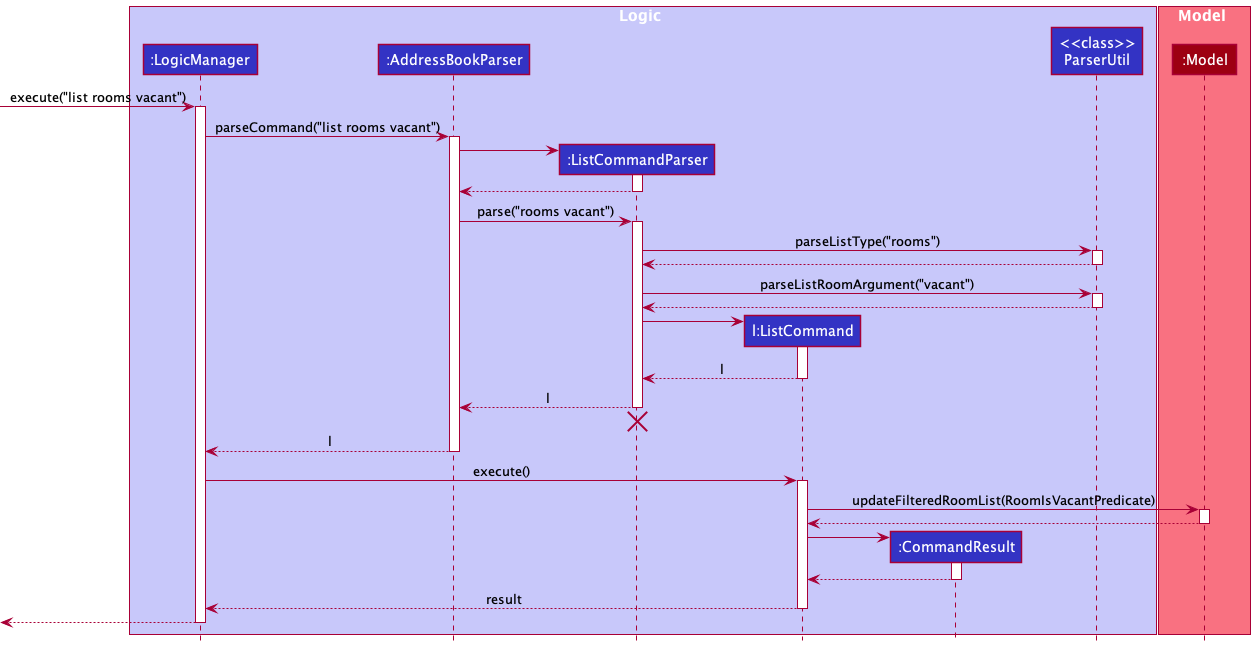
The list rooms occupied command works the same way, except a RoomIsOccupiedPredicate is passed as argument when calling Model#updateFilteredRoomList().
The rooms of the specified vacancy status will appear in the room list.
Design considerations:
Aspect: How list room occupied / vacant executes:
- The
ParserUtilchecks that theListRoomArgis valid (either “occupied” or “vacant” and not any other arguments), and theListCommandParsercreates a predicate object forModel#updateFilteredRoomList()to filter the rooms based on.- Pros: Consistency - similar implementation as the command to list all rooms, list all guests and list all records.
- Cons: This implementation does not fully adhere to OOP principles like inheritance. No new command classes such as
ListVacantRoomCommandandListOccupiedRoomCommand.
Uniqueness of Guests
Implementation
The mechanism guaranteeing the uniqueness of Guests is facilitated by the Nric class, and its invocation is via AddressBookParser.
-
AddressBookParser#parseCommand()— Interprets the command the user inputs to invoke theAddCommandParser. -
ParserUtil#parseNric()— checks whether aPersonobject already exists with the same Nric.
Design considerations:
Aspect: How duplicates are avoided:
- An
AddCommandthat wants to add aPersonwith anNricthat another existingPersonalready will be considered an invalid command.- Uniqueness — This mechanism will help to prevent the adding of duplicate
Personobjects.
- Uniqueness — This mechanism will help to prevent the adding of duplicate
Encapsulation of Hotel Stays (The Residency System)
Implementation
The stay of guests in a room for a period of time is encapsulated in the Residency class, and Residency objects are created and handled by the ResidencyBook class. Creation of Residency objects is invoked via CheckInCommand.
Design considerations:
Aspect: The Immutability of Person and Room objects
- Due to the immutability of these objects, it is difficult to have them store references to each other.
The creation of the
Residencyassociation class was thus necessary, and also allows additional information about stays to be stored, such as dates and times of check in and check out, among other possible future features.
Aspect: Storing References to Person and Room objects
- Due to
Residencyobjects needing to store references toPersonandRoomobjects, an identification system for the latter two classes had to be created to facilitate JSON storage of the actual references. Otherwise, the JSON would only store copies of thePersonandRoomobjects, which would mean that editing aPerson’s details via the edit command would not affect thePersoncopy in theResidency.
Aspect: Further Expansion to Store Past Records
- For current hotel stays, each room can only have one set of guests checked in at any given time, and likewise, any guest should only be checked into one room at a time.
It thus follows that the
ResidencyBookclass should ensure that each Person and Room object can only be referenced in one Residency at any given time.
However, theResidencyBookshould have the ability to accommodate the Past Records Feature mentioned below, which will involve multipleResidencyobjects referencing the same room. Hence,ResidencyBookhas a boolean parameter in its constructor for allowing duplicates.
Past Records Feature
This section describes how past residencies are stored such that it can be displayed/searched for contact tracing.
The past residencies are read from the same json data file as the other components in the AddressBook, through the JsonAdaptedResidencyBook class.
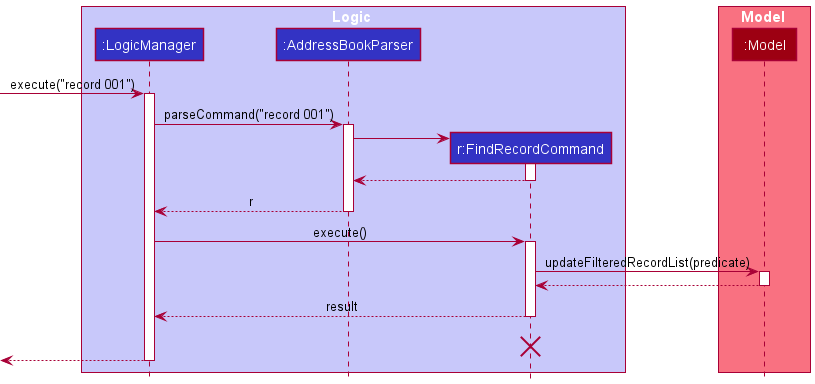
Past residencies can be searched through the use of the record command, where any number of keywords can be entered and any record matching all the keywords are displayed to the user.
Given below is an example of the search function for all the past residencies of room 001.
Design considerations:
- Possible location of storage of past residencies in a second file.
- Pros: Keeping past residency storage separate from the main data storage minimises any mix up in the storing of information.
- Cons: This requires the file to store its own set of persons and rooms and because the residency keeps minimal information in order to minimise space required for the storage file, it results in redundancy when storing the same information across 2 files. Changes also have to be written twice.
- AND vs OR for searching records
- In contrast to the search for guest showing results matching any of keywords given, searching records shows results matching all keywords. This is to allow for more targeted search such as filtering both date and room at the same time to only show records of a particular room at a particular time. This increases the utility of the function in terms of contact tracing.
- Consistency
- The
ResidencyBookof past records inAddressBookmirrors the storage of guests, rooms and current residencies. AFilteredListinModelManagerto represent the records also helps maintain the consistency and readability of the code.
- The
Documentation, logging, testing, configuration, dev-ops
Appendix: Requirements
Product scope
Target user profile:
- hotel receptionist
- has a need to manage a significant number of guests and rooms
- needs a solution for contact tracing within their hotel
- prefers desktop apps over other types
- can type fast
- prefers typing to mouse interactions
- is reasonably comfortable using CLI apps
Value proposition: manage both guests and rooms faster than a typical mouse/GUI driven app
User stories
Priorities: High (must have) - * * *, Medium (nice to have) - * *, Low (unlikely to have) - *
| Priority | As a … | I want to … | So that I can… |
|---|---|---|---|
* * * |
new user | see usage instructions | refer to instructions when I forget how to use the App |
* * * |
user | add a guest as a contact | check them into rooms |
* * * |
user | check guests into rooms | admit them into our hotel |
* * * |
user | check guests out of rooms | free up the room and have their information in the archive |
* * * |
user | search for vacant rooms | assign guests to a vacant room |
* * * |
user | delete guests | remove them if the wrong details are entered |
* * * |
user | list all guests and rooms | check all the statuses |
* |
user with many guests in the address book | sort guests by name | locate a guest easily |
* * |
user | search guests by their name | find a guest’s details easily |
* * * |
user who has to track past records of guests | perform queries on past data | check records of past guests and details of their stay |
* * |
user | add rooms with specified tags | keep track of different types of rooms in my hotel |
Use Cases
Refer to Use Cases.
Non-Functional Requirements
- Should work on any mainstream OS as long as it has Java
11or above installed. - A user with above average typing speed for regular English text (i.e. not code, not system admin commands) should be able to accomplish most of the tasks faster using commands than using the mouse.
- Should work without being connected to the Internet.
- Should be able to use most basic commands within a day of usage.
- User should be able to identify key information on the GUI quickly using colour coded text.
- The system should respond within two seconds of a command input.
- The product is not required to handle the printing of reports.
- The rooms show what type of rooms they are, such as First Class or Standard etc.
- Guests have tags assigned to them to better identify them.
- The data integrity of the application is preserved in the event where the application closes unexpectedly.
Glossary
- Mainstream OS: Windows, Linux, Unix, OS-X
- Private contact detail: A contact detail that is not meant to be shared with others
Appendix: Instructions for Manual Testing
Given below are instructions to test the app manually.
Note: These instructions only provide a starting point for testers to work on;
testers are expected to do more exploratory testing.
Launch and shutdown
-
Initial launch
-
Download the jar file and copy into an empty folder
-
Double-click the jar file Expected: Shows the GUI with a set of sample contacts. The window size may not be optimum.
-
-
Saving window preferences
-
Resize the window to an optimum size. Move the window to a different location. Close the window.
-
Re-launch the app by double-clicking the jar file.
Expected: The most recent window size and location is retained.
-
Guests
-
Adding a guest while all guests are being shown
-
Prerequisites: List all guests using the
list guestscommand. Multiple guests in the list. -
Test case:
add n/John Doe p/98765432 e/johnd@example.com a/John street, block 123, #01-01 id/S98765432G
Expected: A new person object is added to the list of guests, with the name John Doe, and the person’s details as described by the test case input. -
Test case:
add n/Wilburrito
Expected: No new guest is added. This is to be expected as the mandatory fields foraddare not fulfilled. An error message should appear with the correct command format that one should be following. -
Other incorrect add commands to try:
add,add wilburrito
Expected: Similar to previous.
-
-
Editing a guest’s details
-
List all guests using the
list guestscommand. Multiple guests in the list. -
Test case:
edit 1 n/Wilburrito
Expected: The first guest in the list of guests will have their name edited toWilburrito, with a success message reiterating the edited details of the person. -
Test case:
edit 2 n/Wilburger id/S9999999X
Expected: The second person in the list of guests will have their name edited toWilburgeras well as their id edited toS9999999X. -
Test case:
edit 0 n/Wilburroni
Expected: No guests in the list will be edited, and an error will appear sayingInvalid Command Format!due to the index being invalid. -
Other incorrect edit commands to try:
edit,edit xwherexis an index that is larger than the largest index of the guest list.
Expected: No guests in the list will be edited, and an error will appear sayingInvalid Command Format!.
-
-
Checking in a guest into a room
- Prerequisites:
- List all Person objects using the
list guestscommand. Multiple guests in the list. - List all the Room objects using the
list roomsroom. Multiple rooms in the list.
- List all Person objects using the
-
Test case:
checkin 001 g/1
Expected: The first person in the list of guests gets checked into Room 001, with the success message:Room Checked In: 001. -
Test case:
checkin 002 g/2 g/3
Expected: The second and third person in the list of guests gets checked into Room 002, with the success message:Room Checked In: 002. -
Test case:
checkin 000 g/4 g/5
Expected: The fourth and fifth person in the list of guests does not get checked into Room 000, because Room 000 does not exist, as it is an invalid room number. - Other incorrect checkin commands to try:
checkin,checkin 1000 g/1,checkin g/1
Expected: Similar to previous.
- Prerequisites:
-
Checking out a guests from a room
- Prerequisites:
- List all Person objects using the
list guestscommand. Multiple guests in the list. - List all the Room objects using the
list roomsroom. Multiple rooms in the list. - Make sure that at least 1 guest is checked into any Room 001.
- List all Person objects using the
-
Test case:
checkout 001
Expected: The guest in Room 001 will be checked out with the messageRoom Checked Out: 001being shown. The room’s occupancy status should change fromOccupiedtoVacant. -
Test case:
checkout 1000
Expected: An error sayingThe room index provided is invalid. Index should be the one that is displayed in the Room panels below. - Other incorrect commands to try:
checkout,checkout x, wherexis an index greater than the largest index in the current Room list.
Expected: Forcheckout, an errorInvalid command format!will be shown. Forcheckout x, There will be the same error as described in 6iii.
- Prerequisites:
-
Searching for guests
-
List all guests using the
list guestscommand. Multiple guests in the list. Make sure that there is a guest namedWilburritoand a guest namedBerniceby either editing an existing guest or adding a new one, and also that there is no guest namedzzzzzzzz. Make sure to do this before testing each of the test cases below. -
Test case:
guest wilburrito
Expected: The list will show any matches to the namewilburrito. If you followed step 4i, this will return at least 1 guest in the guest list. -
Test case:
guest wilburrito bernice
Expected: The list will show any matches to the namewilburritoandbernice. If you followed step 4i, this will return at least 2 guests in the guest list. -
Test case:
guest zzzzzzzz
Expected: The list will show any matches to the namezzzzzzzz. If you followed step 4i, this will return 0 guests in the guest list. -
Incorrect commands to try:
guest.
-
Rooms
-
Adding rooms
-
List all rooms using the
list roomscommand. Multiple rooms in the list, not exceeding 900 rooms. -
Test case:
addroom 1 t/luxury
Expected: A room will be added to the end of the Room list, and it will appear with the tagluxury. -
Test case:
addroom 3 t/special
Expected: 3 rooms wll be added to the end of the Room list, and they will appear with the tagspecial. -
Test case:
addroom 1000 t/shouldnotwork
Expected: No rooms will be added, and an error will be shown, sayingAdding 1000 more room(s) would exceed the maximum 999 rooms allowed. -
Other incorrect commands to try:
addroom,addroom 1,addroom xwherexwill cause the number of rooms to exceed 1000. Expected:addroom,addroom 1will cause an error to be shown, sayingInvalid command format.addroom xwill cause the same error to be shown as described by 5iv.
-
-
Searching for rooms by room number
-
List all rooms using the
list roomscommand. Multiple rooms in the list (at least 2 but not more than 900). Make sure to use this command each time before trying a new test case. -
Test case:
room 001
Expected: The room list should now only show001. -
Test case:
room 001 002
Expected: The room list should now only show001and002. -
Test case:
room 901
Expected: The room list should show no rooms, as there were only 900 rooms in the initial room list. -
Test case:
room 1000
Expected: An errorInvalid command format!will be shown, and the specified room will not appear as it is not possible for it to exist. -
Other invalid commands to try:
room,room 000. Expected: An errorInvalid command format!will be shown. Depending on the command input, a brief description of why the command is invalid may be provided.
-
-
Listing all rooms
- Test case:
list rooms
Expected: All rooms are displayed in the Rooms panel.
- Test case:
-
Listing all occupied rooms
- Test case:
list rooms occupied
Expected: All occupied rooms are displayed in the Rooms panel.
- Test case:
-
Listing all vacant rooms
- Test case:
list rooms vacant
Expected: All vacant rooms are displayed in the Rooms panel.
- Test case:
Records
-
Listing all records
- Test case:
list records
Expected: All past records are displayed in the History panel, sorted from most recent record at the top.
- Test case:
-
Searching for records
-
List all records using the
list recordscommand. Multiple records in the list (at least 2). Make sure to use this command each time before trying a new test case. -
Test case:
record Alex
Expected: All records with the keywordAlexare displayed in the History panel. -
Test case:
record 001
Expected: All records with the keyword001are displayed in the History panel -
Test case:
record 2021-11-01
Expected: All records with the date 2021-11-01(both checkin and checkout) are displayed in the History panel. -
Test case:
record Alex 001
Expected: ALl records with both keywordsAlexand001are displayed in the History panel. -
Invalid command to try:
record. Expected: An errorInvalid command format!will be shown.
-
Saving data
-
Dealing with corrupted data files
-
Locate the data saved for Trace2Gather in the JSON file
[JAR file location]/data/trace2gather.json. -
Open the file and remove some braces to invalidate the data format of the json file.
-
Re-run the application.
-
Expected: Trace2gather runs, showing a GUI with no data. Upon a command that writes to the data file such as adding a room or guest, the old invalid data file is flushed out and replaced by the new one.
-
-
Dealing with missing data file
-
Remove the data file saved for Trace2Gather in the directory
[JAR file location]/data. -
Re-run the application.
-
Expected: Trace2gather creates a sample data file and runs, showing the GUI with the sample data.
-
Appendix: Effort
Summary
In this project, we experienced challenges when implementing our backend, frontend, editing documentation, and fixing bugs.
In the backend, we had to build on the existing implementation and introduced our own data structures to prevent cyclic-dependencies.
On the frontend, we had to match the specifications as much as possible whilst also ensuring that our new features not only worked well but also stylistically was coherent to our product.
In the documentation, we had to edit many of the diagrams and their accompanying explanations to account for the changes in our application as compared to the original AB3.
Backend
The naive implementation would have been for Room objects to contain a set of guests (Persons), and once a room is checked out, all the room’s information is moved into a list containing all historical records.
The Person objects would also contain the Room that they are checked into.
However, Person objects are immutable in AB3, and Room objects were made immutable to match. This would make it difficult for both objects to store references to each other, especially since Person objects can be edited frequently.
Our solution was to create an association class, the Residency class, that stores pointers to both the Room and guests. This way, when a guest is edited, we use the guest’s information to retrieve the
Residency object that is keeping track of all the rooms that has this same guest inside and all the historical records that have this same guest inside and update the guest to reflect the edited guest’s information.
Frontend
While we reused many of the original AB3’s code extensively, our project was harder due to having 3 different lists as compared to the AB3 which originally only had 1 list.
This was compounded by the fact that we had dependencies between these 3 entities, and we had to make sure that the updates in the backend are reflected in the frontend.
We also made an effort to ensure that stylistically, the new additions were different from the original AB3 but still helped to fit into the overall style of the project.
Documentation
As our implementation included new data structures and new commands to interact with those data structures, we had to modify the documentation extensively to reflect these new changes.
This included creating new diagrams and adding new explanations for our features.
Furthermore, our application also removed some commands from the original AB3, most notably the delete command.
Since this command was used as an example along with its accompanying sequence diagram, we had to modify that entire section and replace the sequence diagram too.